Vacation & Out-of-Office
Configure automatic email replies and mark yourself as away in the calendar when you're on vacation or out of office.
Prerequisites
- A SOGo 5 account with valid credentials
- You are logged into SOGo 5
- Vacation/auto-reply must be enabled by your administrator
(
SOGoVacationEnabled = YES)
Step-by-Step Instructions
Step 1: Open Vacation Settings
- Click the gear icon ⚙ (Settings) in the top toolbar
- Select Vacation from the settings menu
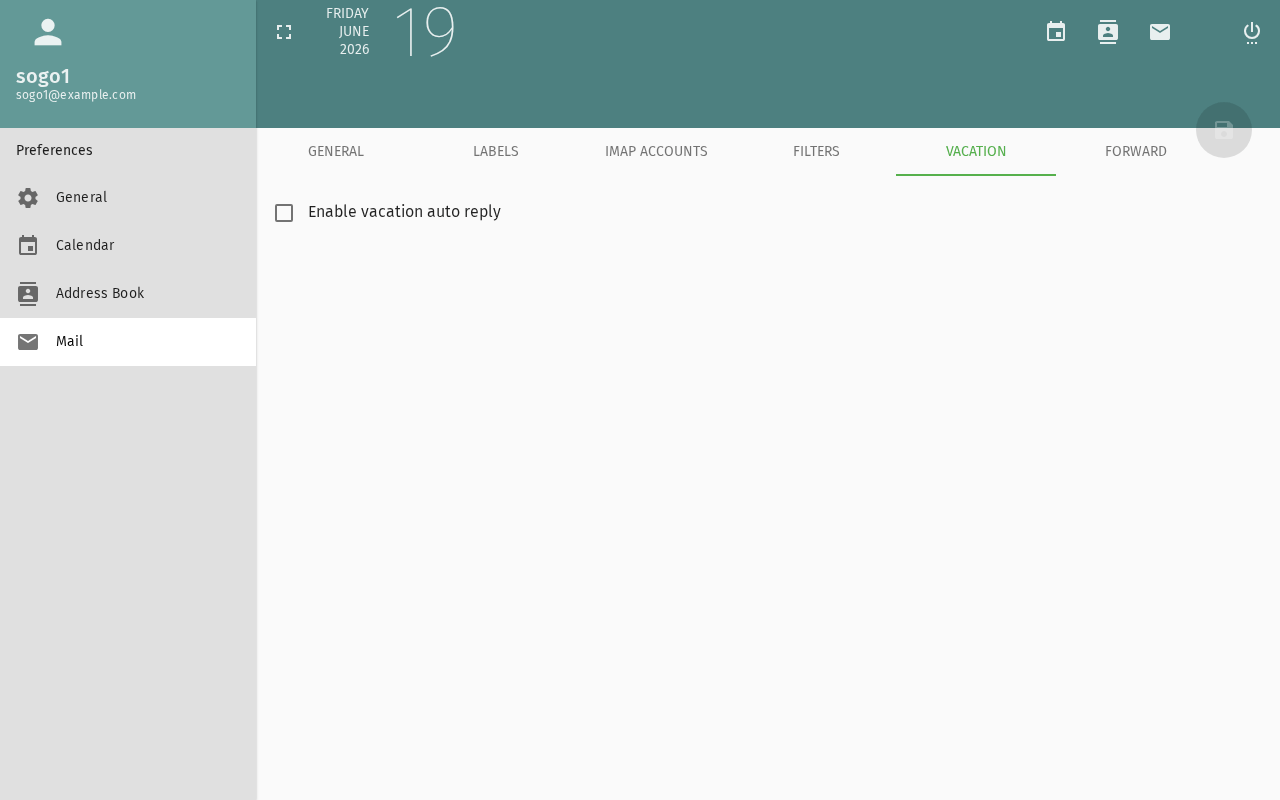
Step 2: Enable Auto-Reply
Toggle Enable auto-reply to ON.
Step 3: Set the Date Range
| Field | Description: What this field is for | Example: Example value |
|---|---|---|
| Start date | When your absence begins | 2026-07-15 |
| End date | When you return | 2026-07-28 |
| Time zone | Your local timezone | Europe/Berlin |
The auto-reply activates on the start date at 00:00 and deactivates after the end date at 23:59.
Set the range to include travel days — enable it the evening before you leave and disable it the morning after you return.
Step 4: Write Your Auto-Reply Message
Compose the message that will be sent to people who email you:
Subject: Out of office — John Doe

Thank you for your message.

I am out of the office from July 15 to July 28, 2026,
with limited access to email.

For urgent matters, please contact Jane Smith
(jane.smith@company.com).

Best regards,
John Doe
Step 5: Choose Reply Options
| Option | Description: What this option does |
|---|---|
| Send reply to | Everyone, or only people in your contacts/address book |
| Repeated replies | Send once per sender (default) or every time they write |
| Keep original subject | Add Re: or keep the original subject line |
Recommended: Send once per sender to avoid flooding colleagues who email multiple times.
Step 6: Save
Click Save or Apply. The Sieve script is activated on the mail server.
Calendar: Marking Your Absence
While you're configuring vacation, also block your calendar:
Create a Vacation Event
- Open the Calendar module
- Create a new event covering your absence period
- Set it as an All-day event
- Add "Out of Office" or "Vacation" as the title
- Mark it as Busy or Out of Office in the visibility settings
- Save
This blocks the time so colleagues see you're unavailable when checking free/busy.
Testing Your Setup
Send a Test Email
- Send an email to your SOGo 5 address from another account
- You should receive the auto-reply within a few minutes
- The auto-reply only fires once per sender (per configured rule)
Check Vacation Status
Re-open Settings → Vacation to verify:
- The toggle shows ON
- Date range is correct
- Message is saved
Disabling Auto-Reply
When you return:
- Go to Settings → Vacation
- Toggle Enable auto-reply to OFF
- Click Save
The auto-reply stops immediately. Optionally delete the calendar block event.
Troubleshooting
Auto-reply not sending
- Check that vacation is enabled by your administrator
- Verify the Sieve server is running (
SOGoSieveScriptsEnabled) - The auto-reply only sends once per sender — test with a different email address
- Check that the date range includes the current date
"Sieve script error" when saving
- The Sieve server may be unavailable
- Contact your administrator to check the Sieve service
- Simplify the message text (special characters can cause issues)
Conclusion
Vacation auto-reply ensures people know you're away without leaving them wondering. Combined with a calendar block, colleagues can see your availability at a glance.
Accessibility
Keyboard Navigation
SOGo 5 supports full keyboard navigation for vacation settings.
| Action | Keyboard Shortcut: What key to press | Notes: Additional information |
|---|---|---|
| Open settings | Alt+M, Tab to gear icon | |
| Navigate settings | Arrow keys in settings menu | |
| Open Vacation settings | V or search for "Vacation" | |
| Enable toggle | Space to toggle ON/OFF | |
| Navigate form fields | Tab between fields | |
| Save settings | Ctrl+S or Enter on Save button | |
| Cancel | Escape closes dialog |
Screen Reader Workflow
Step 1: Open Settings Menu
Alt+Mto focus sidebarTabto gear icon (settings)Enterto open menu- Screen reader: "Settings, popup menu..."
Step 2: Navigate to Vacation
- Arrow keys to "Vacation" in menu
Enterto open Vacation settings- Screen reader: "Vacation, heading, level 3"
Step 3: Enable Auto-Reply
Tabto "Enable auto-reply" toggle- Screen reader: "Enable auto-reply, checkbox, not checked"
Spaceto toggle ON- Screen reader: "Enable auto-reply, checkbox, checked"
Step 4: Set Date Range
Tabto Start date field- Type or select date (format: YYYY-MM-DD)
Tabto End date field- Type or select end date
Tabto Time zone dropdownArrowkeys to select timezoneEnterto confirm
Step 5: Write Auto-Reply Message
Tabto message text area- Type auto-reply message
- For multi-line: Enter to create new lines
- Screen reader announces: "Message, content editable, blank"
Step 6: Configure Reply Options
Tabto "Send reply to" dropdownArrowto select: "Everyone", "Only contacts", or customTabto "Repeated replies"Arrowto select: "Once per sender" or "Every time"Tabto "Keep original subject"Spaceto toggle ON/OFF
Step 7: Save Vacation Settings
Tabto Save buttonEnterto activate- Screen reader: "Save, button"
- Screen reader announces: "Settings saved" or "Auto-reply enabled"
Common Screen Reader Announcements:
| Announcement: What screen reader says | Meaning: What it means | Action: What to do |
|---|---|---|
| "Enable auto-reply, checked/unchecked" | Toggle state | Press Space to change |
| "Start date, edit" | Date field ready | Enter date (YYYY-MM-DD) |
| "Message, content editable" | Message textarea | Type your auto-reply |
| "Save, button" | Ready to save | Press Enter to save |
| "Settings saved" | Success | Auto-reply now active or updated |
Visual Content Descriptions
vacation.png: This 3.5-second animated GIF shows configuring vacation auto-reply in SOGo 5.
- Frame 1 (0-1.7s): Vacation settings page with "Enable auto-reply" toggle in OFF state
- Frame 2 (1.7-3.5s): Toggle switched to ON (appears blue), date range fields filled (Start date and End date), auto-reply message text area shows example message, reply options configured
Screen Reader Alternative: If you cannot view this GIF, please use the Screen Reader Workflow section above.
Duration: 3.5 seconds, 2 frames
File size: 11.1 KB
High Contrast Mode
SOGo 5 currently does not have built-in high contrast mode. Workarounds for low-vision users:
Browser/OS-Level High Contrast:
- Windows:
Win+Ctrl+Ctoggles high contrast → Settings → Ease of Access → High Contrast - macOS:
System Preferences → Accessibility → Display → Increase contrast - Browser Extensions: Dark Reader, High Contrast (Chrome)
Important Toggle States:
- Toggle ON (checked) → Usually blue or highlighted background
- Toggle OFF (unchecked) → Usually gray or unhighlighted
- Screen reader announces checked/unchecked status